

In this article
- Best Apps to Watch Live Cricket
- 1. JioHotstar
- 2. Sony LIV
- 3. FanCode
- 4. ZEE5
- 5. JioTV
- 6. WAVES
- Which Is the Best Cricket Live Streaming App?
- How to Watch a Live Cricket Match in India
- Step 1: Find the official streaming platform
- Step 2: Download the official app
- Step 3: Search for the match
- Step 4: Check access requirements
- Step 5: Start streaming
- Can You Watch Live Cricket for Free?
- Live Streaming Match Cricket India: Which App Should You Check First?
- Live Streaming Cricket Apps vs Live Score Apps
- Streaming apps
- Live score apps
- Tips for Watching Live Cricket Without Buffering
- Use a stable internet connection
- Adjust video quality
- Close unnecessary apps
- Keep the app updated
- Check your data allowance
- Avoid unofficial streaming links
- How Much Data Does Live Cricket Streaming Use?
- Frequently Asked Questions
- 1. What are the best apps to watch live cricket in India?
- 2. Which app can I use to watch a live cricket match for free?
- 3. How can I watch an India cricket match on my mobile?
- 4. Are live cricket streaming apps available for Android and iPhone?
- 5. Can I watch IPL matches on my phone?
- 6. Can I watch live cricket without an app?
- 7. Which apps provide live cricket scores without video streaming?
- 8. Why is a live cricket match not available in my streaming app?
- Final Verdict
Cricket fans no longer need to sit in front of a television to follow their favourite teams. With the right mobile app, you can watch live cricket matches on your smartphone, tablet, laptop or smart TV, whether you are following an international series, the Indian Premier League (IPL), a domestic competition or a T20 league.
However, finding the best apps to watch live cricket is not always straightforward. Different broadcasters hold the streaming rights for different tournaments, and some matches require a paid subscription while others may be available through free broadcasts or promotional offers.
In this guide, we cover the leading live cricket streaming apps, explain how to watch a live cricket match in India, and share practical tips for choosing an option that suits your budget and viewing preferences.
Best Apps to Watch Live Cricket
Here are some of the main apps cricket fans in India can check for official live streaming. The exact matches available depend on the tournament, broadcaster, location and current streaming rights.
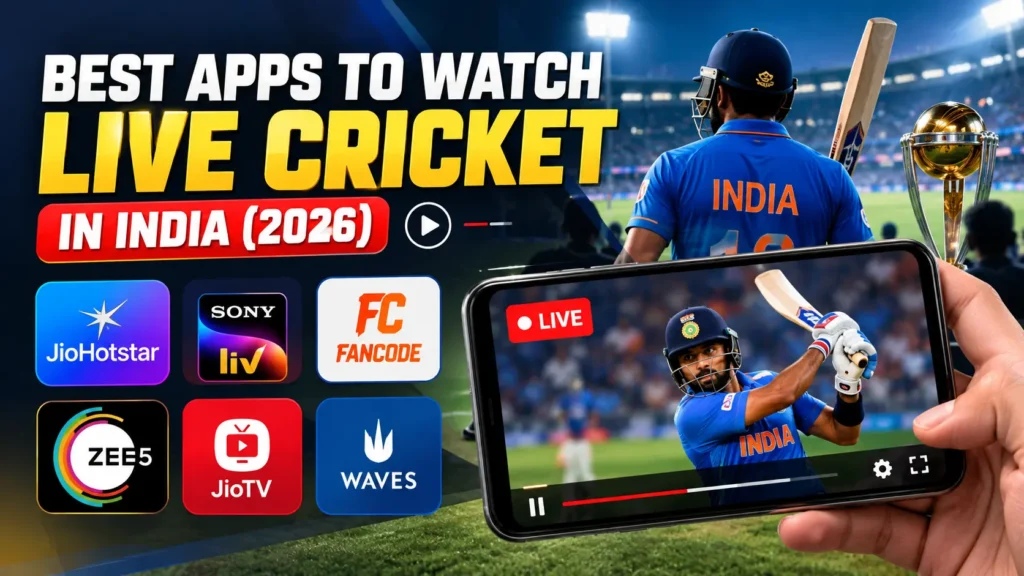
1. JioHotstar
JioHotstar is one of the major platforms to check when you want to watch live cricket in India. It brings together streaming content from the JioHotstar platform, including selected major cricket tournaments and international matches for which it holds digital rights.
The app can be used on supported smartphones, tablets, browsers and connected television devices.
Key features:
- Live streaming of eligible cricket tournaments and matches
- Match highlights and replays where available
- Commentary and viewing options that vary by event
- Support for compatible mobile devices and smart TVs
- Additional entertainment content alongside sports
Best for: Cricket fans looking to watch major tournaments and selected Indian cricket matches through one streaming service.
Is it free? Access depends on the event and the current subscription or promotional offer. Check the match listing and plan details before purchasing a subscription.
2. Sony LIV
Sony LIV is another option for fans who want to watch live cricket online. Sony’s sports coverage includes selected cricket competitions, with availability depending on the broadcaster’s rights for each event.
The platform also offers other sports and entertainment content, making it useful for viewers who follow more than cricket.
Key features:
- Live sports streaming for eligible events
- Match-related programming and highlights where available
- Access through supported devices
- Sports and entertainment content in one app
Best for: Viewers looking for cricket competitions and other sports carried by Sony’s broadcasting network.
Is it free? Live sports generally require an eligible subscription or access package. Confirm the current requirements before subscribing.
3. FanCode
FanCode is a sports-focused streaming platform that cricket fans can check for selected domestic and international competitions, overseas leagues and other sporting events.
Its coverage can be particularly useful when a tournament is not available on the main streaming service you usually use. Depending on the event, viewing access may be offered through a subscription, a competition-specific pass or another available package.
Key features:
- Coverage of selected cricket tournaments and leagues
- Sports-focused content and match information
- Event-specific viewing options where offered
- Access to additional sports beyond cricket
Best for: Fans who follow a variety of cricket leagues and competitions, including events with separate streaming arrangements.
Is it free? Some content or offers may be available at no additional cost, but other matches require payment. Check the specific tournament listing for current access options.
4. ZEE5
ZEE5 is a streaming platform that offers entertainment and selected sports content. Depending on its current broadcasting arrangements, it may provide access to particular cricket tournaments or sports channels.
It is worth checking when you are trying to find a specific match that is not listed on your regular streaming app.
Key features:
- Streaming of available sports content
- Access to entertainment programming
- Support for compatible devices
- Subscription-based viewing options for eligible content
Best for: Viewers checking alternative official streaming services for selected cricket competitions.
Is it free? Availability and payment requirements vary by content and subscription package. Do not assume that every cricket match is included.
5. JioTV
JioTV provides access to live television channels through supported devices and eligible service arrangements. Depending on your account, package and the channel’s broadcast schedule, you may be able to watch cricket through a sports channel carried by the service.
This makes JioTV different from a dedicated streaming platform: the match may be available because the relevant television channel is included in your access package.
Key features:
- Live television channels
- Sports channels where included
- Access through supported mobile devices
- Catch-up television features for eligible programming
Best for: Viewers who already have an eligible Jio service or package and want to check whether a sports channel is available.
Is it free? Access depends on the service, channel and account eligibility. A Jio connection alone does not guarantee that every cricket match is available at no extra cost.
6. WAVES
WAVES is a streaming platform associated with Prasar Bharati, India’s public-service broadcaster. It is another place to check for selected sports programming and events that may be available through public broadcasting arrangements.
Its cricket coverage should not be assumed to include every international series, IPL match or major tournament.
Key features:
- Access to selected public-broadcast content
- Live television and other programming where available
- A further option to check for eligible sports broadcasts
Best for: Viewers looking for cricket or sports programming that is specifically made available through public broadcasting.
Is it free? Some content may be accessible without a separate paid subscription, but availability depends on the programme and the applicable distribution arrangements.
Which Is the Best Cricket Live Streaming App?
There is no single app that guarantees access to every cricket match. The best option depends on the competition you want to watch and whether you prefer a free or paid service.
| App | Best suited for | What to check |
|---|---|---|
| JioHotstar | Major cricket tournaments and selected international matches | Tournament rights and subscription |
| Sony LIV | Cricket and other sports carried by Sony | Eligible sports package |
| FanCode | Selected leagues and competitions | Event pass or subscription |
| ZEE5 | Selected sports and cricket content | Current event availability |
| JioTV | Live television sports channels | Account and channel eligibility |
| WAVES | Selected public-broadcast programming | Whether the match is listed |
Before installing an app or paying for a subscription, search for the exact match name. For example, look up the India vs Australia series or the specific IPL fixture you want to watch. This is more reliable than choosing an app based only on its general cricket coverage.
How to Watch a Live Cricket Match in India
If you are wondering how to see a live cricket match on your phone, follow these steps.
Step 1: Find the official streaming platform
Check the tournament’s official website or its broadcaster announcement to identify the authorised digital streaming service in India. Streaming rights may differ between international cricket, IPL, domestic cricket and overseas leagues.
Step 2: Download the official app
Install the selected app from the Google Play Store or Apple App Store, or use its official website on a supported browser. Verify the developer or publisher before downloading.
Step 3: Search for the match
Open the app and look for the live sports or cricket section. Search for the teams or tournament, then open the relevant fixture.
Step 4: Check access requirements
Some matches may be available without a separate payment, while others require a subscription, an event pass or an eligible bundled plan. Review the conditions before making a purchase.
Step 5: Start streaming
Log in if required and select the live match. If the stream does not appear, check the match start time, your account access and whether the event is available in your region.
That is the basic process for watching a live cricket match online without relying on unofficial streaming websites.
Can You Watch Live Cricket for Free?
Yes, some cricket matches and sports broadcasts may be available free of charge, but free access depends on the event and the broadcaster.
Here are some legitimate options to check:
- Free-to-air television broadcasts and their authorised digital services
- Official streaming promotions or free viewing offers
- Eligible telecom or broadband plans that bundle a streaming subscription
- Selected sports events made available through public broadcasting
- Official cricket boards’ websites or apps for authorised live video, where offered
Remember that free live scores, commentary and highlights are not the same as a full live video stream. A website may provide ball-by-ball updates without having the rights to show the match itself.
If an app claims to stream every premium cricket tournament for free without clear broadcasting rights, be cautious. Avoid downloading unknown APK files or sharing payment details with unverified services.
Live Streaming Match Cricket India: Which App Should You Check First?
When searching for live streaming match cricket India, start with the exact competition rather than downloading multiple apps.
For a major international tournament or an IPL match, check the official digital broadcaster announced for that event. For a bilateral series, look for the broadcaster carrying that particular tour. For domestic competitions and overseas leagues, check the tournament’s official coverage details because rights can be distributed across several platforms.
This approach can save you time and prevent you from paying for a subscription that does not include the match you want.
Live Streaming Cricket Apps vs Live Score Apps
Not every cricket app lets you watch the match on video. Some are designed primarily for live scores, commentary, statistics and news.
Streaming apps
Streaming apps provide live video when they have the relevant rights. They may also offer replays, highlights, expert analysis and multiple commentary options.
Examples include JioHotstar, Sony LIV and FanCode, depending on the match.
Live score apps
Live score services help you follow a match when you cannot watch a video stream. They typically provide the current score, wickets, overs, player statistics, ball-by-ball commentary and match results.
Examples include Cricbuzz and ESPNcricinfo.
For cricket fans who are travelling, working or dealing with a slow internet connection, a live score app can be a useful alternative. You can follow the action without streaming a continuous video feed.
Tips for Watching Live Cricket Without Buffering
Even the best cricket live streaming app can struggle if your internet connection is unstable. Try these tips for a smoother experience.
Use a stable internet connection
A reliable Wi-Fi connection or strong mobile data signal can reduce buffering. If the stream keeps stopping, switch networks where possible.
Adjust video quality
If your data connection is slow, select a lower resolution. High-definition streaming uses more data and may buffer more frequently on an unstable connection.
Close unnecessary apps
Apps running in the background can consume bandwidth or device resources. Close those you do not need while watching the match.
Keep the app updated
Install updates from the official app store. Updates can include performance improvements, security fixes and compatibility changes.
Check your data allowance
Live video can use substantial mobile data, particularly at higher resolutions. If you plan to watch a full T20 or ODI match, check your remaining data allowance beforehand.
Avoid unofficial streaming links
Unofficial websites can have unreliable video, intrusive advertisements, misleading download prompts and potential security risks. An authorised broadcaster is generally the safer option.
How Much Data Does Live Cricket Streaming Use?
Data consumption depends on the app, video resolution, device and streaming settings. Higher-quality video generally consumes more data than standard-definition playback.
As a practical guide, streaming can use several hundred megabytes per hour at lower quality and substantially more at HD settings. Actual consumption may vary, so check the app’s settings and your device’s data-usage report if you have a limited mobile plan.
If you are watching a full match using mobile data, consider reducing the resolution or connecting to a trusted Wi-Fi network.
Frequently Asked Questions
1. What are the best apps to watch live cricket in India?
JioHotstar, Sony LIV, FanCode, ZEE5, JioTV and WAVES are options to check, depending on the tournament and current streaming rights. No single service necessarily carries every match.
2. Which app can I use to watch a live cricket match for free?
Free access varies by event. Check official free broadcasts, authorised streaming offers, eligible bundled subscriptions and public-broadcast services. Always confirm that the specific match is included.
3. How can I watch an India cricket match on my mobile?
Find the official Indian broadcaster for the series or tournament, install its authorised app, search for the fixture and check whether you need a subscription or eligible package.
4. Are live cricket streaming apps available for Android and iPhone?
Many major streaming services offer mobile apps for Android and iOS. Availability, supported devices and features can vary, so check the official app store listing.
5. Can I watch IPL matches on my phone?
Yes, provided you use the authorised streaming service for the relevant IPL season in your region. Check the current broadcaster announcement and the app’s access requirements before the match.
6. Can I watch live cricket without an app?
Yes. If the authorised broadcaster supports browser streaming, you may be able to watch through its official website on a phone, laptop or computer. Some services require you to sign in.
7. Which apps provide live cricket scores without video streaming?
Cricbuzz and ESPNcricinfo are popular options for live scores, ball-by-ball commentary, scorecards and cricket news. Their score updates should not be confused with a full live video broadcast.
8. Why is a live cricket match not available in my streaming app?
The event may be carried by a different broadcaster, may not be available in your region, may require a separate subscription or may not have started yet. Check the tournament’s official broadcast details.
Final Verdict
The best app for live cricket depends on what you want to watch. JioHotstar, Sony LIV and FanCode are useful starting points for checking authorised cricket streams, while JioTV and WAVES may provide additional options for eligible television broadcasts and selected events.
Before subscribing, confirm that your chosen service carries the exact match you want to watch. If you only need scores and commentary, a dedicated live score app may be enough.
For cricket fans, the smartest choice is the official streaming service that covers their preferred tournament, works reliably on their device and fits their budget.


Join the conversation